
My Portfolio
Analyze your existing mutual fund investments.
Parsing Securely
Encrypting & analyzing your document...
Upload your CAS Statement
Your data. Namay turns it into something you can actually understand.
Don't have your CAS statement?
Download it for free — it takes under 2 minutes.
Recommended: CAMS CAS for detailed mutual fund transaction history.
This is a demo with made-up numbers. Upload your CAS to see your real portfolio.
Current Value
₹8,42,350
+40.4% overall
Net Invested
₹6,00,000
across 5 schemes
Total Returns
+₹2,42,350
unrealised gains
XIRR
16.3%
annualised return
Your Funds Breakdown
| Scheme | Net Invested | Current Value | Returns | XIRR |
|---|---|---|---|---|
| Mirae Asset Large Cap | ₹1,50,000 | ₹2,08,400 | +38.9% | 16.2% |
| Parag Parikh Flexi Cap | ₹1,00,000 | ₹1,51,200 | +51.2% | 19.8% |
| Axis Small Cap Fund | ₹75,000 | ₹98,100 | +30.8% | 12.4% |
| HDFC Nifty 50 Index | ₹1,75,000 | ₹2,38,650 | +36.4% | 15.1% |
| Kotak Emerging Equity | ₹1,00,000 | ₹1,46,000 | +46.0% | 18.2% |
| Mirae LC | PP Flexi | Axis SC | HDFC N50 | Kotak EE | |
|---|---|---|---|---|---|
| Mirae LC | — | 18.4% | 12.1% | 38.7% | 22.3% |
| PP Flexi | 18.4% | — | 8.9% | 24.2% | 15.6% |
| Axis SC | 12.1% | 8.9% | — | 6.3% | 19.8% |
| HDFC N50 | 38.7% | 24.2% | 6.3% | — | 41.5% |
| Kotak EE | 22.3% | 15.6% | 19.8% | 41.5% | — |
How to download your CAS from CAMS
4 simple steps — takes less than 2 minutes
How to download your CAS from CAMS
4 simple steps — takes less than 2 minutes
Open the CAMS CAS page
Select "Detailed" statement
Choose Detailed (not Summary). Detailed statements include transaction history, which helps Namay perform a more complete portfolio analysis.
Select Specific Period and choose an early From date
Select Specific Period and choose a From date that covers your earliest investment. If you're not sure when you started investing, choose an earlier date to make sure your investment history is included.
Enter your registered email and create a password
Enter the email ID registered with your mutual fund folios and create a password for the statement. CAMS will send the password-protected CAS PDF to your registered email.
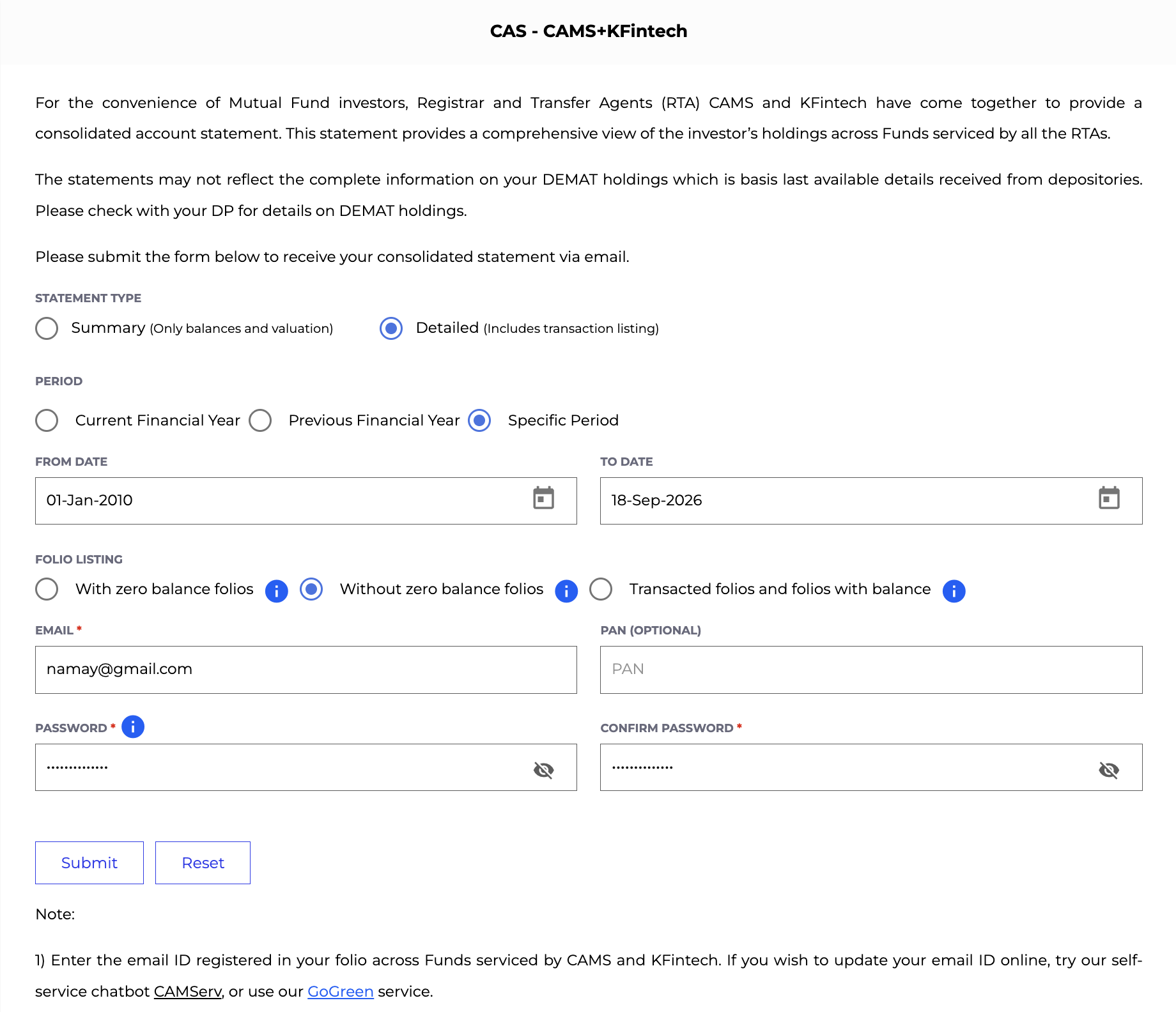
The CAMS CAS download form — select Detailed, enter your dates & email.
Open CAMSInvestor
—
Statement Period
—
Current Value
—
Net Invested
—
Total Returns
—
XIRR
—
Lifetime Purchases
—
Lifetime Redemptions
—
Active Schemes
—
Portfolio Growth Over Time
Invested vs Portfolio Value. Red dots mark redemption events.
Investment Summary
Summary of all schemes found in your CAS statement.
| Scheme Name | Net Invested | Current Value | Returns | XIRR |
|---|
Running portfolio analysis…
Raw Transactions (count 0)
List of all transactions parsed from the CAS file.
Raw Transactions (count 0)
List of all transactions parsed from the CAS file.
| Type | Amount | NAV | Units |
|---|